How a guest asks for texts
This page is for anyone reviewing the SimpleInvite text message program. It shows where a guest asks for texts, the words beside the box, and what follows. The demo invite is a working invite page with a made-up event, open to anyone: answer it, and the offer of texts appears under your answer.
Open the demoThe wording, word for word
The event's name takes the place of [Event]. Under the wording sit two links, SMS terms and Privacy, to the pages on this site.
Send me texts from SimpleInvite about [Event]: any change or note from the host, and a reminder the day of. Up to 4 texts. Msg&data rates may apply. Reply HELP for help. Reply STOP to opt out.
- How it starts
- Unchecked. The guest has to tick it and save.
- Where it appears
- On the invite page at invite.simpleinvite.app, under the guest's answer, and only after they have answered. It is offered only on events where texts will be sent.
- What it covers
- Texts about this one event. It is never bundled with anything else, and no other box sits beside it.
- What it holds back
- Nothing. The guest has already answered; answering never asks for a number, and leaving the box unticked changes nothing else.
The flow, end to end
A host sends an invite
By email from us, or as a text from the host's own phone carrying the guest's own link. Nothing in this program is sent before step 5.
The guest opens it
On invite.simpleinvite.app, with no account and nothing to install.
The guest answers
Yes, no, or not sure yet. Answering never asks for a phone number.
The guest asks for texts
Under the answer, one line offers texts: after a yes, about changes and the day itself; after a not sure, one question on the day the page names (“Not sure yet? Text me Thursday”). It opens a mobile number field, filled in if the host gave one and always editable, and the unchecked box with the wording above.
We record the consent
The number, the exact words shown, the time, the IP address and the browser, against this one event.
The confirmation goes out
One text, at once: how many texts to expect, that rates may apply, and how to get HELP or STOP. Like every text from our number, it starts with “SimpleInvite:”.
STOP ends it everywhere
STOP, or a plain-English request to stop, ends texts from SimpleInvite to that number for every event and every host, at once, until the person replies START. Any other reply gets at most one answer from us.
The screens themselves
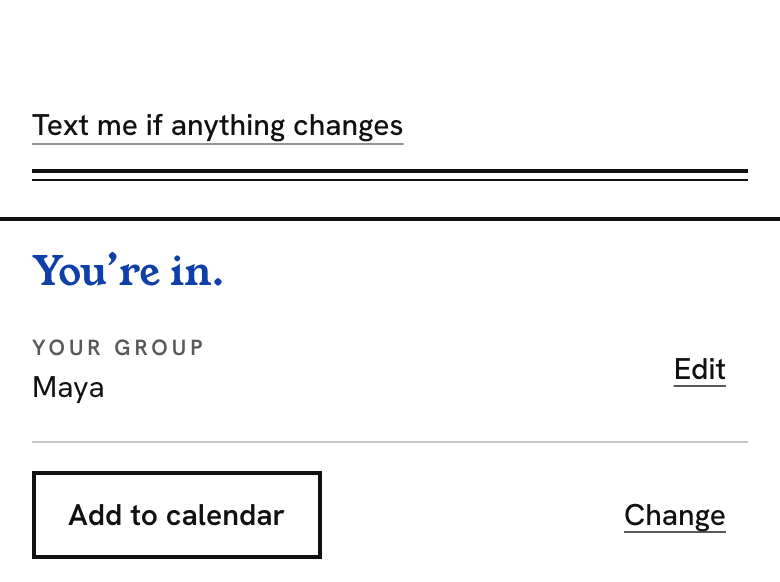
The offer, under an answer already given.
What it proves
That texts are offered only after the guest has answered, and only as an option.
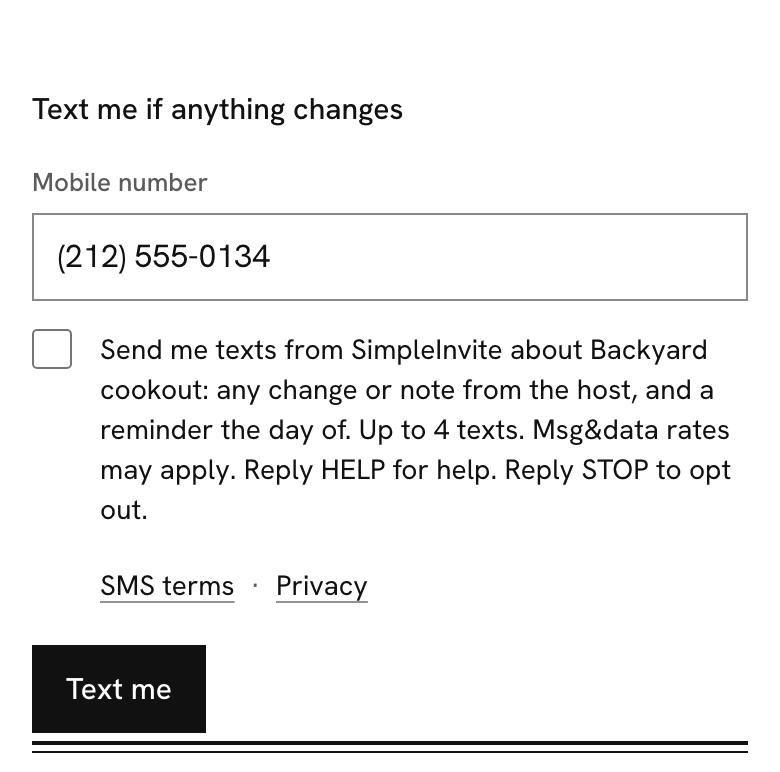
The number, the unchecked box, and the wording.
What it proves
The exact wording, that the box starts unchecked, that it stands alone, and the links to the SMS terms and the privacy policy.

Ticked and saved.
What it proves
That texts start only after the guest ticks the box and saves.
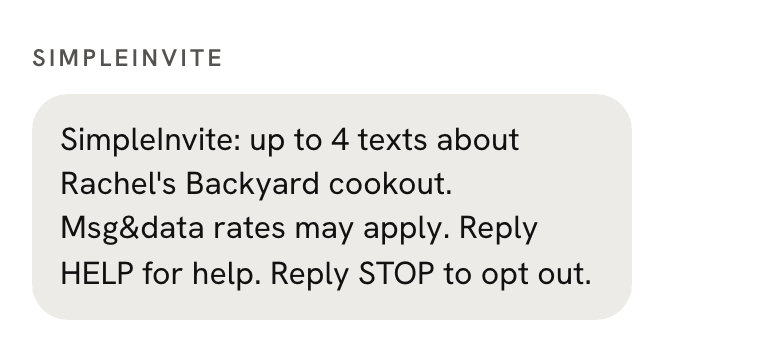
The confirmation a guest gets at once.
What it proves
The program name, how many texts to expect, the rates line, HELP and STOP.

Stop, on the invite page.
What it proves
That a guest can turn texts off from the invite itself, as well as by replying STOP to any text.
Every text a guest can get
The bracketed fields are filled from the event, and every link uses our own domain, nvite.app. Each text starts with “SimpleInvite:” and fits in one message.
- Confirmation
- SimpleInvite: up to 4 texts about [Host]'s [Event]. Msg&data rates may apply. Reply HELP for help. Reply STOP to opt out.
- Confirmation, not sure yet
- SimpleInvite: up to 4 texts about [Host]'s [Event], starting [Weekday]. Msg&data rates may apply. Reply HELP for help. Reply STOP to opt out.
- The question on that day
- SimpleInvite: can you make it to [Host]'s [Event] on [Weekday]? Reply Y or N. nvite.app/[code]
- A change
- SimpleInvite: [Host]'s [Event] is now [Weekday] at [Time], [Place]. Still coming? Reply Y or N. nvite.app/[code]
- The day of
- SimpleInvite: [Host]'s [Event] is today at [Time], [Place]. Still coming? Reply Y or N. nvite.app/[code]
- A note from the host
- SimpleInvite: [Host] wrote about [Event]: Bring a chair if you have one. Parking is on the street. nvite.app/[code]
- Called off
- SimpleInvite: [Host] cancelled [Event] on [Weekday].
- An answer to a guest's Y
- SimpleInvite: you're in for [Event] on [Weekday]. See you at [Time]. nvite.app/[code]
- HELP
- SimpleInvite: texts about invites from people you know. Reply Y or N to answer. Msg&data rates may apply. Reply STOP to opt out. help@simpleinvite.app